

How Do I Print Barcode Labels?
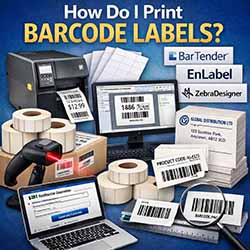
Printing barcode labels is a common requirement for businesses that sell, store, track, or ship products. Whether you’re a retailer, manufacturer, warehouse operator, or office user, there are several ways to print barcode labels depending on your volumes, budget, and setup.
What Do You Need to Print Barcode Labels?
At a basic level, you’ll need three things:
- A barcode label printer (or a standard desktop printer)
- Labels (on rolls or sheets)
- A way to create the barcode, either using software, fonts, or online tools
You may also want a barcode scanner to test and use the printed barcodes in day-to-day operations.
Choosing a Label Printer
If you are printing barcode labels regularly or in higher volumes, a dedicated label printer is usually the best option. These printers are designed specifically for labels and offer fast print speeds, accurate positioning, and durable results.
Label printers typically print onto roll labels, making them ideal for product labels, pallet labels, shelf labels, and shipping labels.
For lower volumes or occasional printing, you can also use a standard inkjet or laser printer with sheet labels. This is often suitable for office environments or short runs.
Rolls of Labels vs Sheets of Labels
Roll labels
- Used with dedicated label printers
- Ideal for high-volume or continuous printing
- Available in many sizes, materials, and adhesives
Sheet labels
- Used with inkjet or laser printers
- Suitable for small batches or office printing
- Often designed to work with Word or similar software
Both options can be used for barcode labels, the right choice depends on how many labels you need and how often you print.
Barcode Label Design Software
To create professional barcode labels, many users rely on specialist label design software. Popular options include:
- Bartender – widely used in industrial and warehouse environments
- EnLabel – a flexible and cost-effective option for many businesses
- ZebraDesigner – designed for use with Zebra label printers
These programs allow you to create labels that combine barcodes, text, logos, prices, and variable data, often pulling information directly from spreadsheets or databases.
Using Barcode Fonts
Another option is to use barcode fonts, which can be downloaded from the internet and installed on your computer. Once installed, you can type the barcode data into programs like Microsoft Word or Excel and apply the barcode font to generate a scannable barcode.
This can be a simple and low-cost solution, but it’s important to ensure:
- You use the correct font for the barcode type (e.g. Code 128, EAN-13)
- The barcode is sized correctly
- The printed result scans reliably
Free Online Barcode Generators
There are also many free websites that allow you to create barcodes online. These tools typically let you:
- Choose a barcode type
- Enter your data
- Export the barcode as an image file (such as PNG or JPG)
You can then insert the barcode image into Word, generic design software, or artwork for printing onto labels. This method works well for occasional use or simple applications.
Don’t Forget Barcode Scanners
Printing barcode labels is only part of the process. You’ll usually need a barcode scanner to read them.
Barcode scanners are used for:
- Point-of-sale systems
- Stock control
- Order picking
- Asset tracking
Choosing a reliable scanner helps ensure your printed barcodes are read quickly and accurately in real-world use.
Pre-Printed Labels with Overprinting
In some cases, the most efficient solution is to use pre-printed labels. These can include fixed information such as:
- Company name
- Address
- Logo
- Branding or legal text
You can then overprint variable information such as product type, price, batch number, or barcode using your own printer. This approach reduces print time, improves consistency, and is ideal for businesses with branded labels.
We can supply pre-printed labels tailored to your requirements, ready for you to overprint exactly what you need.
Summary
There are several ways to print barcode labels, from simple sheet labels printed in Word to high-volume roll labels produced on dedicated label printers. The best solution depends on your print volumes, workflow, and the level of control you need.
By choosing the right printer, labels, software, and barcode creation method and pairing them with a suitable barcode scanner, you can create reliable, professional barcode labels that work seamlessly in your business.
If you need advice on printers, labels, scanners, or pre-printed barcode labels then please contact us as choosing the right setup from the start can save time, money, and frustration later on.